
Seamless Shipping
Fast, reliable delivery with Real-time tracking and updates
Access your account through Moorah Login using your registered phone number and password. The Sign In page provides a straightforward way for returning customers to access Moorah through Web or H5, while first-time users can log in with OTP.
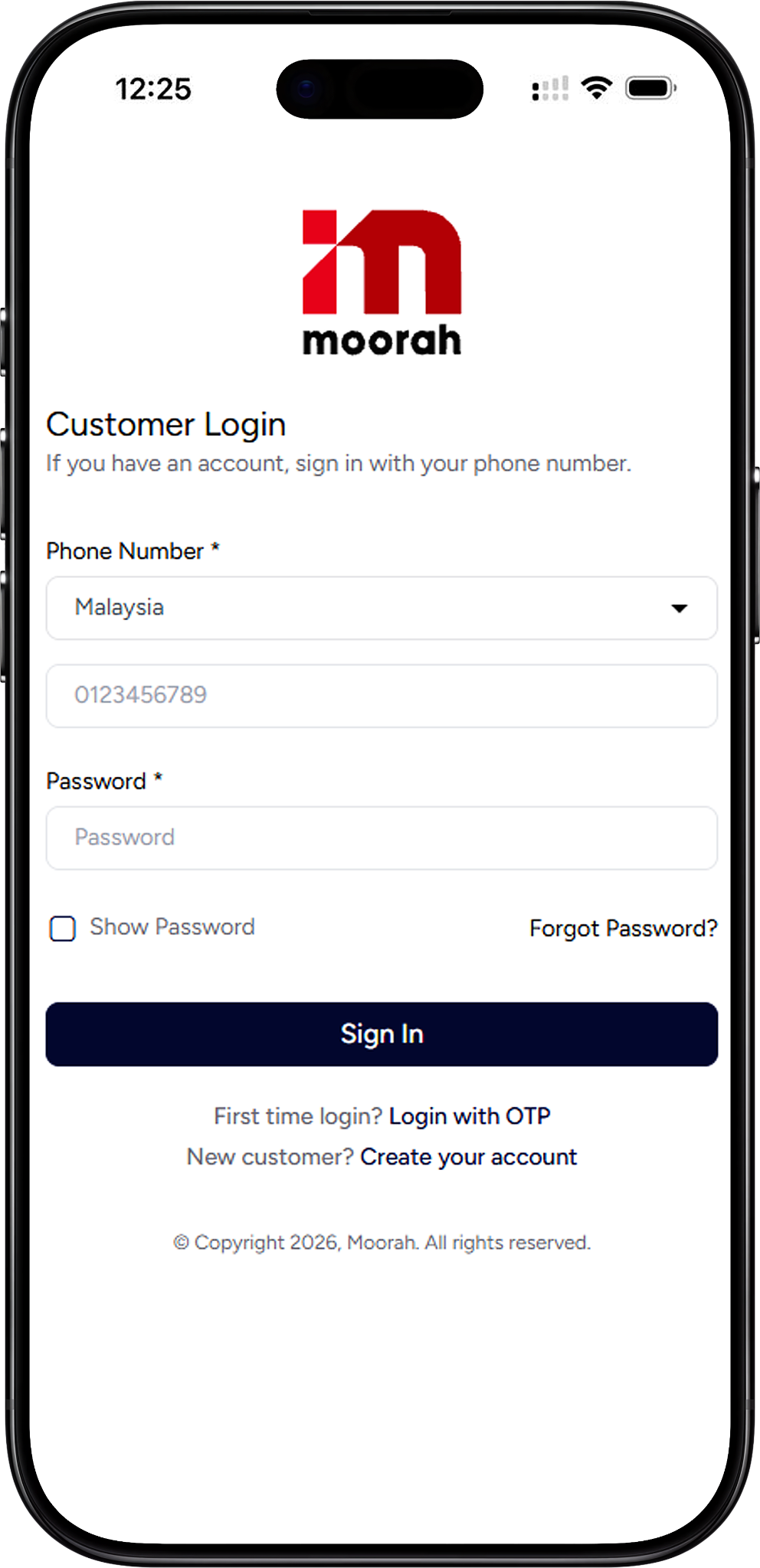
Follow the steps below to Sign In to your Moorah account with your registered phone number and password.
Visit the Moorah Login page using your browser. The Customer Login section provides the fields required to access your account.
Open the country selector under Phone Number and choose the appropriate country before entering your registered mobile number.
Enter the phone number associated with your Moorah account in the Phone Number field. Make sure the number is entered correctly before continuing.
Type your account password in the Password field. You can select Show Password if you need to check the password you entered.
Check your login details and select Sign In to proceed to your Moorah account.
Moorah Login also provides an OTP option for customers signing in for the first time. This allows first-time users to begin the login process using their phone number.
From the Customer Login page, find First time login? and select Login with OTP to continue with the first-time login process.
Follow the instructions displayed on the screen to complete the OTP login process. Enter the requested information carefully before proceeding.
The Moorah Login page can be accessed through a compatible Web browser or H5 interface, allowing customers to sign in without navigating away from the online platform.
Open the Moorah website in your browser and navigate to the Customer Login page. Enter your registered phone number and password, then select Sign In.
Customers using the H5 version can follow the same Moorah Login process by entering their phone number and password in the available login fields.
If you cannot remember your password, use the Forgot Password? option displayed on the Customer Login page instead of repeatedly entering an incorrect password.
Select Forgot Password? beside the login section to begin the password recovery process.
Complete the steps shown on the page to proceed with password recovery, then return to Moorah Login when your login details are ready.
Customers who do not yet have an account can use the account creation link available directly from the login page.
Find New customer? below the Sign In button and select Create your account to proceed to the Moorah registration page.
After completing the account creation process, return to the Moorah Login page and use the appropriate login method to access your account.
Returning customers can Sign In using their registered phone number and password.
Yes. The Customer Login page includes a Show Password option that lets you check the password entered in the field.
Select Login with OTP from the Customer Login page and follow the instructions shown on the screen.
Yes. Moorah Login can be accessed through the Web login page using a compatible browser.
Select Forgot Password? on the login page and follow the displayed password recovery instructions.
Select Create your account from the Customer Login page to proceed to account registration.
Enter your registered phone number and password to access your Moorah account, or use Login with OTP if you are signing in for the first time.
Fast, reliable delivery with Real-time tracking and updates

Earn bonuses for every friend you invite

Win Jackpot by purchasing products

Get assistance on 8AM - 8PM daily